How to Measure Employee Productivity Without Micromanaging
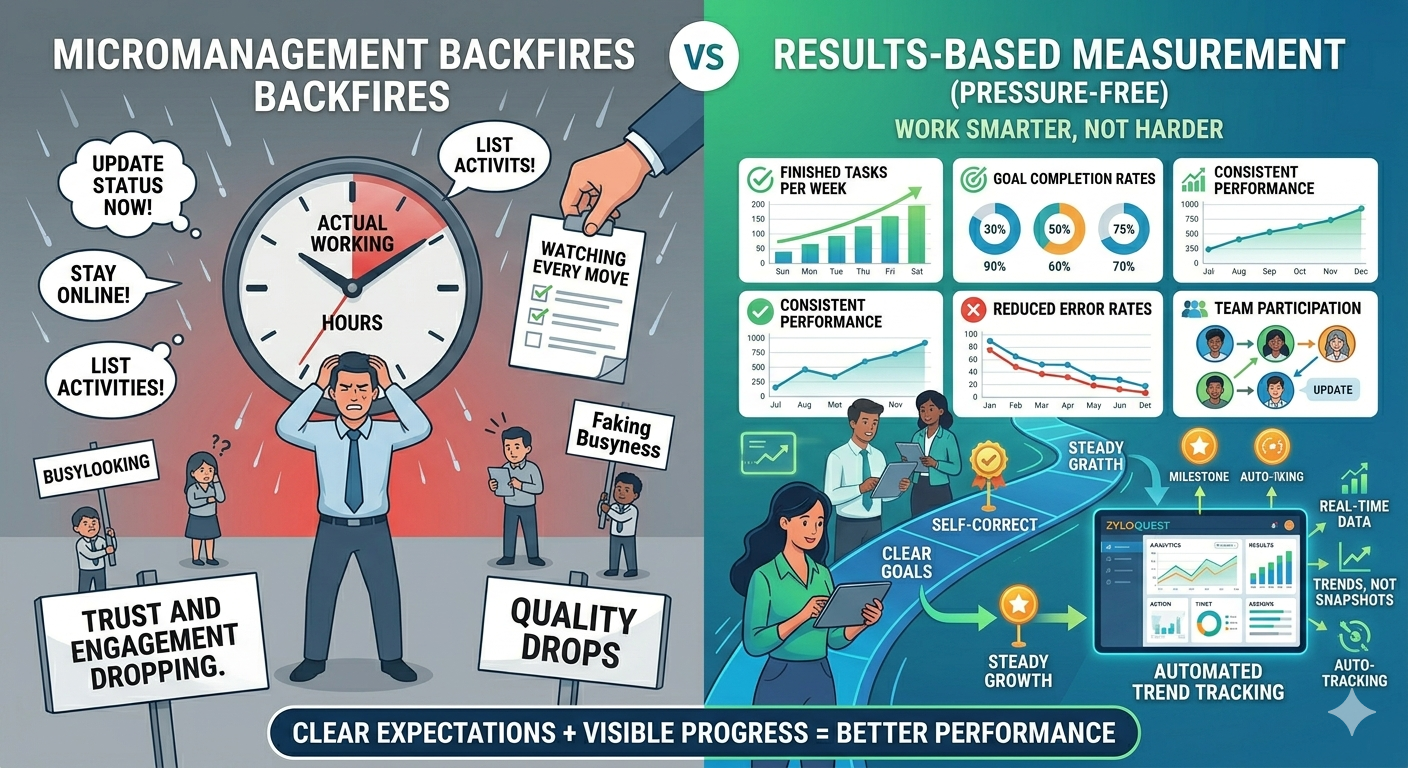
A lot of managers think watching every move is the best way to boost productivity. It's really not. When people feel like someone's always looking over their shoulder, they don't actually do better work. They just get good at looking busy. Instead of focusing on what matters, they waste energy on appearances. Honestly, micromanaging backfires more often than it helps.
The smarter strategy? Measure real results, not just busyness. See what gets done, how well it's done, and if it happens consistently. When you track productivity this way, you don't have to chase people for updates or snoop on every task. Good work stands out on its own.
Productivity isn't about racking up desk hours. It's about the value an employee actually creates while they're working. Two people might clock the same hours, but their output can be worlds apart.
That's where teams trip up. They obsess over effort: hours logged, time online, lists of activities. Those numbers look helpful, but they don't reveal if anything meaningful actually got accomplished.
Micromanaging shifts focus from getting results to simply being visible. When everyone knows they're under constant scrutiny, they spend more time updating, responding quickly, or staying active on tools. But that's rarely the same as actually achieving something.
It slows things down, too. Every little decision has to go through a manager, which leads to bottlenecks. After a while, people just give up on thinking for themselves and wait to be told what to do. Quality drops, speed drops, and everyone loses.
And then there's trust. When people feel like their boss doesn't believe in them, engagement falls off a cliff. Once engagement goes, productivity almost always goes with it.
If activity isn't the answer, what is? Start with output: how many tasks get finished, how many goals get checked off. That paints a clear picture.
But quality matters just as much. If there's tons of rework or mistakes, high output doesn't count for much. Keeping an eye on error rates balances things out.
Consistency gets overlooked a lot, but it's key. Someone who does great one week and crashes the next isn't reliable. You want steady, dependable performance.
Participation is the final piece. Are folks actually joining in, updating progress, and engaged in the team's workflow? If not, something's missing.
Keep it simple. Finished tasks per week, goal completion rates, time it takes to get things done, how often deadlines are met, error rates, participation, and consistency over time all give you a real sense of performance. You don't need a complex setup, just the right numbers.
Start by setting clear goals. If nobody knows what they're aiming for, tracking turns chaotic. When targets are sharp, it's easier for everyone to see progress without being bugged all the time.
Let teams see their own numbers. Once people know how they're doing, they self-correct. No need for constant reminders.
Track trends, not every single action. Who cares what happened every hour? Look at performance weekly or monthly. Patterns matter way more than random snapshots.
Automation helps a lot here. If tracking is manual, it takes forever and leaves gaps. When updates are real-time, managers aren't forced to keep asking for status; they just look and see.
Most teams still rely on random spreadsheets or scattered apps. It might seem fine at first, but it falls apart fast.
Data arrives late. By the time you see what's going on, it's already changed. Updates rely on people remembering to fill things in; they are not reliable. Managers waste time piecing together info from everywhere. And worst of all, nobody cares. Tracking feels like a chore to the team.
That's why so many productivity systems flop.
Manual tracking feels slow and depends on everyone entering data. Automated tracking spits out results in real-time and you don't have to worry about mistakes.
Manual setups barely show what's happening, while automated ones give everyone a clear view. Ask yourself: does tracking fire up the team or just write down numbers? With automation, it can actually boost engagement.
Combine visibility with engagement. People do better when they can see their progress and feel invested in it.
Make the process transparent, let the team see wins as they happen. Celebrate the small victories. Everyone keeps up easily.
Some platforms kick things up a notch with challenges, leaderboards, or simple rewards. Suddenly, tracking isn't passive; it's something people actually care about. Tools like ZyloQuest mix real-time tracking with engagement, so productivity doesn't just get measured; it improves.
Sales teams look at targets and conversions, plus consistency week over week.
HR teams measure participation and activity completion. High engagement often means the system's doing its job.
Operations teams care most about task completion and timelines. If delays or bottlenecks show up in tracking, those are problems to fix.
Metrics change by team, but the principle stays the same: measure outcomes, not just activity.
Productivity isn't about control; it's about clarity. If teams understand what's expected, see their progress, and get measured by real results, performance gets better on its own.
Micromanaging tries to boost productivity by hovering. Smart systems do it by making things clearer.
That's the difference. One way watches people work. The other helps them work smarter and faster. Tools like ZyloQuest lean toward the second: performance is visible, consistent, and pressure-free.
Focus on actual outcomes. Track tasks finished, goals hit, quality, and consistency. Those show way more than hours worked or online activity.
Tasks completed, goal completion rate, time to finish, error rate, and steady performance. Simple, but they get to the heart of it.
Set clear targets and check real progress. Use tools that reveal trends, not just who spent the most time. That way, managers don't need to babysit.
Anything with real-time updates, clear dashboards, and automation does the trick. These cut manual effort and give everyone a better view of how things are going.